Comparisons
Live captioning and AI live translation pricing in 2026: 13 tools compared by cost per hour
Wordly, Transync AI, JotMe, Maestra, Oralion, Zoom, Google Meet, Teams: no two charge the same way. We converted the public prices of 13 live captioning and AI interpreting tools into a cost per hour, with free allowances and what each is best for.
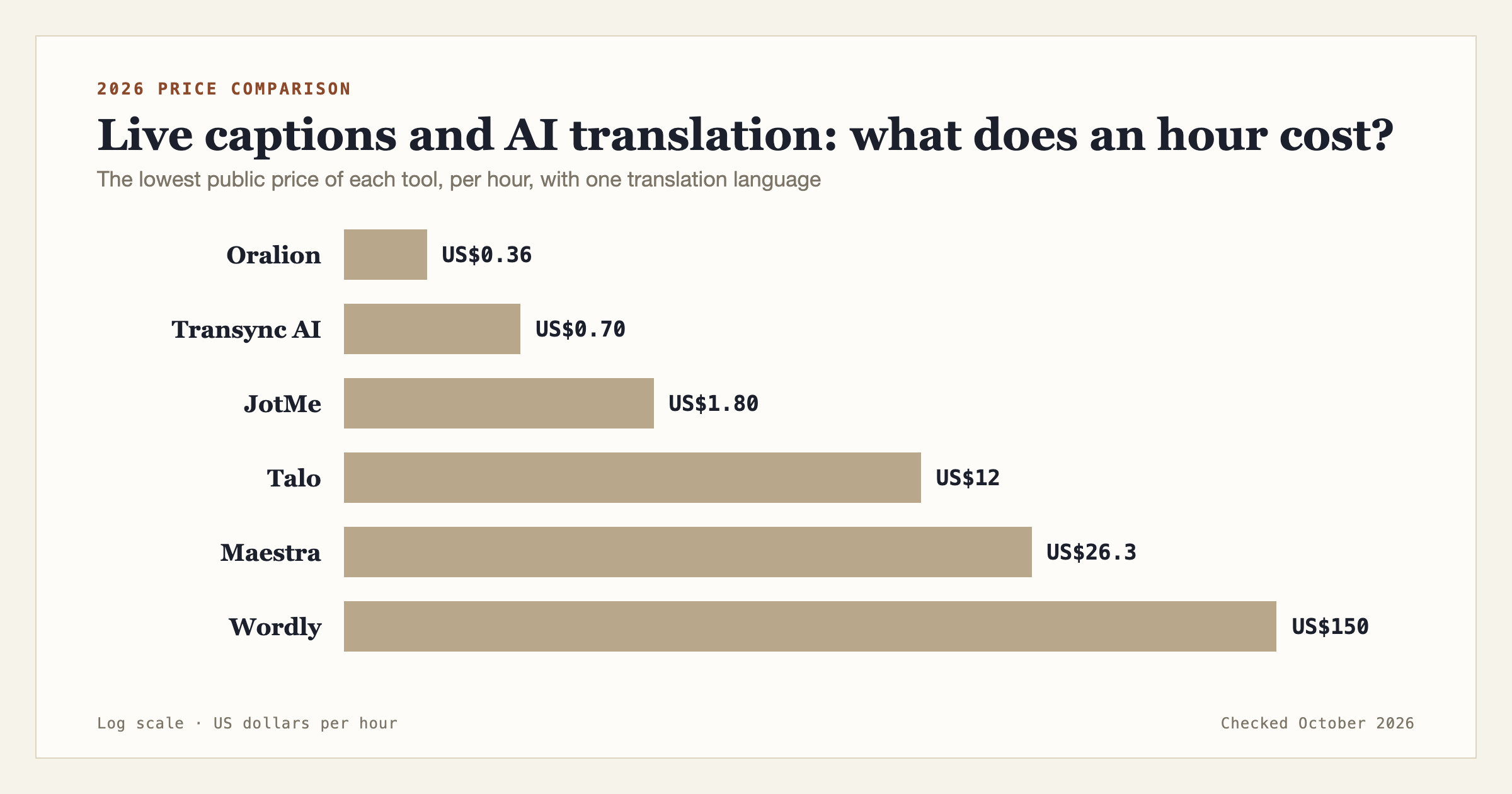
If you want live captions and translation for an event, a class or a cross-border meeting, there are far more tools to choose from than there were two years ago. The trouble is that no two of them charge the same way: by the hour, by the month, by the session, by the seat, and quite a few do not publish a price at all until you have talked to sales.
This article covers 13 common live captioning and AI live translation tools and converts their public prices into one unit, the cost per hour, so you can compare them directly. All prices were checked in October 2026, and the source for each is listed at the end.
We have tried to present every tool by the same standard, and every figure can be verified from the links at the end.
How we compared
To put tools with different pricing models side by side, we fixed three things.
First, everything is converted to a cost per hour. For a monthly plan, that is the monthly fee divided by the hours it includes. For tools that sell hour packages, we used the packages listed on their websites.
Second, we compared the most basic case: one speaker in one language, translated live into one other language.
Third, we used only prices published on official websites. Where the official site lists none and the figure comes from a third party, we say so.
Live translation tools: price table
The table is sorted by cost per hour, lowest first.
| Tool | Public price | Per hour | Free allowance |
|---|---|---|---|
| Oralion (50-credit pack) | US$19.99, never expires | about US$0.36 | about 5 hours a month |
| Oralion (10-credit pack) | US$4.99, never expires | about US$0.45 | about 5 hours a month |
| Transync AI (time card) | 100 hours for US$69.99 | US$0.70 | 40 minutes at sign-up |
| Transync AI (personal, monthly) | US$8.99/month, 10 hours | US$0.90 | 40 minutes at sign-up |
| JotMe Premium (annual) | US$15/month, 500 minutes | US$1.80 | 20 minutes a month |
| JotMe Pro (annual) | US$10/month, 200 minutes | US$3.00 | 20 minutes a month |
| JotMe Pro (monthly) | US$20/month, 200 minutes | US$6.00 | 20 minutes a month |
| Talo Pro | US$80/month, 400 minutes | US$12.00 | trial |
| Talo Starter | US$33/month, 95 minutes | about US$20.80 | trial |
| Maestra Premium | US$79/month, 180 minutes of live translation | about US$26.30 | trial |
| Wordly | from about US$1,500 for 10 hours | about US$150 | demo on request |
| Snapsight | US$95–250 per session | depends on session length | — |
| KUDO, Interprefy | not published, quote only | — | — |
Translated captions built into meeting software are charged per seat per month and cannot be converted to an hourly cost. They are covered separately below.
Tools for individuals and small teams
Most of these are monthly plans or hour packages that you can start using as soon as you sign up. They suit small events, classes, community gatherings, and people who are often in international meetings.
Transync AI
Transync AI focuses on two-way live translation in meetings. It supports 60 languages, detects the speaker's language automatically, and can produce meeting minutes. The personal plan is US$8.99 a month for 10 hours, reset monthly. The enterprise plan is US$24.99 per seat for up to 40 hours a month, with overage at US$0.70 an hour. It also sells time cards: 10 hours for US$7.99, 30 hours for US$22.99, and 100 hours for US$69.99. A free account gets 40 minutes at sign-up.
At US$0.70 to US$0.90 an hour, it is one of the cheaper tools in this group.
Oralion
Oralion is a live captioning and translation service that runs in the browser. Once the speaker goes on air, the audience scans a QR code or opens a link and reads the captions on their own phones, with no app to install and no sign-up. A room holds up to 150 viewers, and viewers are not charged.
It is billed in Credits: captions in 1–2 languages cost 0.9 Credits an hour, 3 languages 1.4, 4 languages 1.7, and 5 languages 2.0. Voice mode, with AI read-aloud, starts at 1.8 Credits an hour. Credit packs come in 10, 25 and 50, at US$4.99, US$10.99 and US$19.99, and they do not expire. That works out to about US$0.36 to US$0.45 an hour for bilingual captions.
The free plan includes 4.5 Credits a month, about 5 hours, refilled every month. Regular users can take a monthly plan: Pro is US$6.99 a month, with no hour count under fair use.
Its prices are clearly lower than the other tools. According to the team behind it, the project is not run for profit, and the pricing is set to cover operating costs.
JotMe
JotMe is a desktop app that translates live in any meeting or event, with notes and summaries. The Pro plan is US$20 a month, or US$10 a month billed annually, and includes 200 minutes of live translation a month. Premium is US$30 a month, or US$15 billed annually, with 500 minutes. A free account has 20 minutes a month. Plans for events are estimated separately from hours and audience size.
That comes to US$1.80 to US$6 an hour, with annual billing at half the monthly price.
Talo
Talo is an AI interpreter for online meetings. According to figures collected by a third-party site, the Starter plan is US$33 a month for about 95 minutes, and Pro is US$80 a month for 400 minutes, with overage at US$0.25 a minute. The official site does not list prices directly, so check there for the current amounts.
That is roughly US$12 to US$21 an hour, positioned closer to replacing a human interpreter.
Maestra
Maestra began as a subtitling and dubbing tool and also offers live captions and live translation. Basic is US$39 a month for 360 minutes of live captions, with no translation. Premium is US$79 a month for 900 minutes of live captions and 180 minutes of live translation. Business is US$159 a month with 360 minutes of translation.
Note that its live translation minutes are counted per language, so the more languages you add, the less time the same plan gives you. On Premium, live translation works out to about US$26 an hour.
Vurbo.ai
Vurbo.ai is a live transcription and translation tool built by a team in Taiwan, with floating subtitles and two-way interpretation. It is sold as an unlimited-hours subscription. According to a European reseller, the Advanced plan is €49.99 for 30 days and Premium is €149. These are a third party's prices; check the official site for yours.
Because the hours are unlimited, it gets better value the more you use it. If you only need a few hours a month, it is not necessarily cheaper than a tool billed by the hour.
Platforms for large events and conferences
These platforms are built for large conferences and corporate events. They are full-featured, usually with dedicated support and integration with event platforms, and some can be combined with human interpreters. They also cost an order of magnitude more.
Wordly
Wordly is one of the best-known platforms in this field. It sells annual hour packages, from a 10-hour Starter to an Enterprise tier of 500 hours or more. Its website states that pricing starts at about US$1,500 for a 10-hour package, or about US$150 an hour, with larger discounts for larger packages. All languages are included in the one price, with no extra charge per language.
Snapsight
Snapsight charges per session: US$95 to US$250 a session depending on the plan, according to its own blog. For events with a fixed number of longer sessions, that makes the budget easy to estimate.
KUDO and Interprefy
Both offer AI translation and human interpretation. KUDO has a pay-as-you-go option and annual plans from 50 hours a year. Interprefy lets you choose hourly, daily or recurring plans. Neither publishes prices; you need to contact sales for a quote.
Human interpreters, for comparison
Snapsight's overview puts in-person simultaneous interpretation at about US$1,200 to US$2,500 per interpreter per day, and remote simultaneous interpretation at about US$900 to US$2,200. Interpreters work in pairs, so each language pair costs double, and equipment and technicians are extra. This is the baseline the AI platforms above compare themselves with.
Translated captions built into meeting software
If all your meetings already take place in one meeting app, its built-in feature may be the least effort.
Zoom's translated captions are an add-on at US$5 per user per month, on top of a paid plan. Google Meet's translated captions are included in Workspace Business Standard (US$14 per user per month) and above, at no extra cost. Microsoft Teams' live translated captions need Teams Premium, at US$10 per user per month; only the meeting organizer needs the license for every attendee to use them.
The limit they share is that they only work inside their own meetings. You cannot take them to an in-person event and let the audience read captions on their phones.
How to choose
Price is only one factor. Here are suggestions for some common situations.
For a community group, a church, a classroom, or a small to medium conference on a limited budget and only now and then, a tool billed by the hour whose credits do not expire is the best value, such as Oralion or Transync AI's time cards. Minutes in a monthly plan usually vanish at the end of the month, which is easy to waste if you do not use it often.
For an individual or small team with international online meetings every week, compare the monthly plans of Transync AI and JotMe with Oralion's Pro plan, and see which hours and features fit how you work. If every meeting is in Zoom, Meet or Teams, first check whether your company's current plan already includes translated captions.
For an in-person event with an audience, pay attention to how the audience gets to see the captions. Some tools only show them on the speaker's own screen; some let the audience open them on a phone but charge per person. Oralion and Wordly both let the audience read on their own devices; check this before choosing another tool.
For an international conference of a thousand people or more that needs staff on site, integration with an event platform, or human interpreters for the sessions that matter most, platforms such as Wordly, KUDO and Interprefy offer the broader service.
For two people talking face to face on a trip abroad, your phone's built-in translation or Google Translate is enough, and free.
Frequently asked questions
How much does live translated captioning cost per hour? The range is very wide. Tools for individuals run from under US$0.50 to US$26 an hour, large event platforms are around US$150 an hour, and human simultaneous interpreters cost thousands of dollars a day.
Are there free live caption translation tools? Most tools have a free allowance, but the length varies a lot: about 5 hours a month on Oralion, 40 minutes at sign-up on Transync AI, 20 minutes a month on JotMe. Google Meet's translated captions are included in some Workspace plans.
Do more languages cost more? It depends on the tool. Wordly charges the same for any number of languages. Oralion adds to the rate from the third language, reaching 2.0 Credits an hour for five, about US$0.80. Maestra counts minutes separately for each language.
Monthly plan or pay by the hour? It depends on how often you use it. If it is every week, a monthly plan saves money. If you run one or two events a month, hours that do not expire are usually cheaper.
Why do some tools not publish prices? Platforms aimed at large events usually quote by the number of sessions, languages and the support needed, so you have to talk to sales first. If your needs are simple, choosing a tool with public prices saves a lot of time.
Sources
The prices come from the pages below, checked on 9 October 2026. Plans and prices can change at any time; the official sites are the reference.
- Oralion: pricing page
- Transync AI: official pricing page
- JotMe: official plan guide
- Maestra: official pricing page
- Talo: prices collected by SaaSworthy (third party)
- Vurbo.ai: prices at the reseller Streaming Valley (third party)
- Wordly: official pricing page
- Snapsight: guide to event translation costs
- KUDO: official plans page
- Interprefy: official pricing page
- Zoom translated captions: UC Today report
- Google Meet translated captions: Google's help page
- Microsoft Teams live translated captions: TechRadar report
If you find a figure here that is out of date, let us know and we will update it.